Vacation Rental Dynamic Pricing Pitfalls
TL;DR: Dynamic pricing delivers for operators at 10+ properties with clean rate baselines and markets with enough comparable supply. Below 5 properties, or without those conditions, automated pricing typically compresses ADR rather than growing it. Fix your base rates and your calendar first. Then add the algorithm.
What you need before dynamic pricing can help
Every dynamic pricing vendor will tell you the tool pays for itself within 60 days. That claim depends entirely on conditions the marketing never mentions.
Before you pay for any DP tool, check these four boxes.
Work the gates in order. Fail one and you stop there — fix it before a dynamic pricing tool can help rather than hurt.
| # | Gate | If no | If yes |
|---|---|---|---|
| 1 | 90+ days of booking history per property? | Wait until history accumulates before connecting a tool | Go to gate 2 |
| 2 | Base rates calibrated manually first? | Calculate the cost floor per property with the break-even formula | Go to gate 3 |
| 3 | 20+ active comparable listings in the market? | Manual seasonal pricing likely outperforms the algo | Go to gate 4 |
| 4 | Clean OTA calendar sync across channels? | Fix sync before adding rate complexity | Check portfolio size |
| 5 | Portfolio size? | 1-4 properties: manual pricing with seasonal overrides is preferred at this scale | 5+ properties: proceed in suggestion mode, 21 days minimum |
90 days of booking history, minimum. The algorithm identifies demand patterns from your property’s historical performance. A property with 60 days of data is learning from too thin a sample. The tool ends up relying almost entirely on its competitive set, with no anchor in your specific property’s demand curve.
Base rates calibrated manually, before connecting the tool. This is the most common setup failure. Dynamic pricing multiplies your starting point. If your minimum rate is $80/night when your cost structure requires $115 to break even at 50% occupancy, the algorithm will defend that $80 floor in every slow period. You get high occupancy and negative cash flow.
Set your base rates manually first. Calculate your break-even rate: total monthly fixed costs divided by (nights available x target occupancy). That number is your floor. Not “what feels competitive.” Your actual cost floor.
A market with 20+ actively listed comparables. DP tools price relative to their competitive set. In a market with 12 comparables, one large group booking that takes 5 properties offline at once creates a false supply signal. The algorithm sees scarcity that isn’t there, prices high, and you end up with vacancies during a period when real demand is normal.
AirDNA publishes active listing counts by market. Check your market’s supply depth before deciding whether algorithmic pricing has enough data to work from.
Clean calendar sync across all OTAs. If your availability is already mismatched between Airbnb, Vrbo, and Booking.com before you add dynamic pricing, you’re layering rate complexity on top of a calendar problem. Fix the sync first. A DP tool operating on incorrect availability data will price into dates that are actually blocked, creating conflicts or double-booking risk.
If you can check all four: dynamic pricing will likely improve RevPAR meaningfully over a full year compared to static pricing. If you can’t check even one, fix that condition first. The tool is not a substitute for the foundation.
Six signals that dynamic pricing is hurting your revenue
These patterns show up consistently in underperforming portfolios and in operator discussions on r/AirBnBHosts and the BiggerPockets STR forums.
1. Your floor rate is based on feel, not cost
The algorithm will defend your floor rate with mechanical consistency. Set it 20% too low and you’ll run every slow period at 20% below market. The DP tool executes this with perfect efficiency.
The correct calculation: total monthly fixed costs (mortgage, management, insurance, utilities, platform fees) divided by (available nights x minimum viable occupancy) equals your hard floor.
For a property with $2,800/month in fixed costs targeting 50% occupancy minimum, the floor is $2,800 / 15 nights = $186/night. Any rate the algorithm sets below $186 is a loss you’re automating at scale.
Most operators who run DP tools with compressed ADR don’t have a tool problem. They have a floor rate that was set by gut instinct two years ago and never updated for cost changes.
2. You’re running fewer than 5 properties
Below 5 properties, the algorithm doesn’t have enough portfolio data to build reliable demand patterns. It prices against your competitive set with no anchor in your own property’s history.
At 2-3 properties, a well-calibrated manual rate with seasonal adjustments typically matches or outperforms an automated tool. You already know when the local festival drives 95% occupancy. You know which weekends attract families (longer LOS, higher total spend) versus weekend travelers (short stays, price-sensitive). The algorithm spends its first 60-90 days learning what you already know.
The threshold where algorithmic performance consistently outperforms informed manual pricing is around 5-8 properties, when portfolio-level data starts generating reliable patterns the algorithm can act on.
3. You enabled auto-apply on day one
Every DP tool has two modes: suggestion mode, where it recommends rates for your review, and auto-apply, where it executes directly. Vendors push auto-apply because it looks better in their dashboards.
The real risk: the algorithm will make systematic errors specific to your market that you won’t catch until you’ve already lost revenue from them.
A concrete pattern: the algorithm detects that competitors raised rates on a specific weekend and adjusts your rates upward accordingly. But the trigger was a single large property that blocks for a private corporate retreat every year. The “demand signal” was artificial. The algorithm priced you 30% above market for a normal-demand weekend and you got a vacancy.
Run in suggestion mode for 21 days. Review every suggestion before it applies. You’ll identify the categories of errors your market generates, then configure the tool to avoid them.
4. Your minimum stay rules conflict with the gap-fill logic
Most DP tools automatically lower rates for short stays to fill calendar gaps. A 3-night gap on Tuesday-Thursday gets priced down to attract a short-stay booking that fills the vacancy.
This logic works if you want to fill gaps. It fights you if your LOS strategy is to hold for 7-night bookings in a market where 4-night stays are 60% of demand.
The conflict: the gap-fill algorithm lowers rates for short stays, but your 7-night minimum prevents those bookings from completing. You end up with a discounted calendar that still doesn’t book, and a tool suggesting “$89/night” on dates you’d prefer to leave vacant waiting for a weekly booking.
Before connecting any DP tool, decide whether you want gap-fill logic or not. Both PriceLabs and Beyond Pricing let you disable it per property. Most operators who never review this setting are running it in direct conflict with their own LOS strategy.
5. Your market has too few comparables for the algorithm to work accurately
The algorithm needs a reference class large enough to distinguish actual demand shifts from statistical noise. Markets with fewer than 20-25 active comparable listings don’t give it that.
In a market with 10 comparables, one property running a new-listing promotional discount skews the entire competitive set’s pricing signal downward for 30 days. Your algorithm detects “market rates are dropping” and adjusts your prices down. The actual cause was one property in a temporary promotional phase. You priced into that noise.
Use AirDNA’s market data to check your market’s active supply count. Markets under 20 active comparables are better served by manual pricing informed by direct local observation than by an algorithm with an insufficient reference class.
6. You’re using Airbnb Smart Pricing instead of a real DP tool
Smart Pricing is not a dynamic pricing tool in the revenue optimization sense. It’s a booking rate optimizer.
Smart Pricing is designed to keep your listing competitive within Airbnb’s search results. That objective means it prices to maximize your booking rate, which serves Airbnb’s commission revenue. More bookings through Airbnb means more commission income for the platform. The incentive structure is transparent if you look for it.
Third-party tools like PriceLabs and Beyond Pricing use revenue optimization as the objective function. They set rates to maximize ADR at an acceptable occupancy level, using floor rates you define and market demand signals from multiple sources. The ADR difference at equivalent occupancy is typically 15-25%, per aggregated community reports from operator forums.
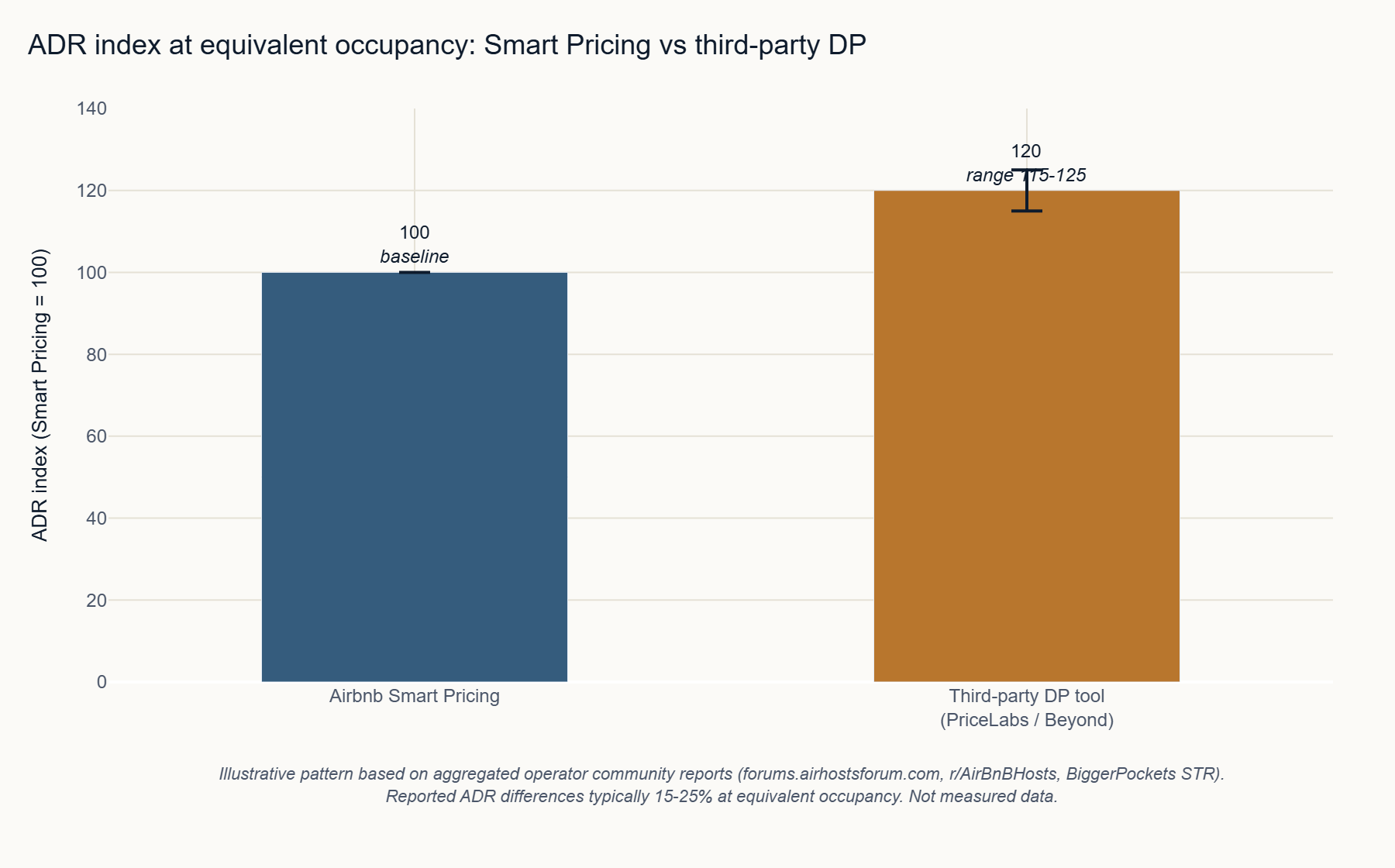
If you’re running Smart Pricing and your occupancy is strong but ADR is flat, the tool is working as designed. It’s just not designed for your goal.
Step-by-step: minimal viable setup
If the prerequisites are met and you’ve decided to proceed, here’s the setup sequence that reduces early mistakes. Plan for 4-6 weeks total.
| Step | Action | When |
|---|---|---|
| 1 | Calculate the hard floor per property | Week 1 |
| 2 | Connect the tool in suggestion mode | Week 1 |
| 3 | Map the 90-day demand calendar | Week 2 |
| 4 | Daily review, 21 days | Weeks 2-5 |
| 5 | Configure rules per error pattern | Week 5 |
| 6 | Auto-apply with a 48-72h window | Week 6 |
Step 1: Calculate and document your hard floor by property.
Before logging into any tool: write down the rate below which you’d rather have a vacancy than a booking, for each property. This is your cost floor from the formula above, plus a minimum margin. That number should exist in a spreadsheet before you touch any DP tool settings.
Step 2: Connect in suggestion mode.
PriceLabs calls this “No auto-apply.” Enable it from the initial setup. Do not activate auto-apply yet.
Step 3: Map your local demand calendar for the next 90 days.
Before the algorithm sets a single rate, manually block premium rates on your 5-8 highest-demand dates: local festivals, sporting events, school breaks, holiday weekends. The algorithm calibrates around your manual overrides. This protects peak revenue from algorithmic conservatism during the learning phase.
Step 4: Review daily for 21 days.
Every morning, check the suggestions for the next 14 days. Note the types of suggestions you disagree with: floor-hitting on dates you expected demand, gap-fill discounts on dates you’d rather hold, underpricing on events the algorithm didn’t detect. Document the pattern categories, not just individual instances.
Step 5: Configure rules to address the patterns you found.
After 21 days, you’ll see 3-5 systematic error categories. Build exclusion rules, orphan-gap settings, and event overrides to address them. Both PriceLabs and Beyond Pricing have the configuration depth to handle this.
Step 6: Enable auto-apply with a review window.
If your tool supports a review delay before rates publish, use it. A 48-72 hour window gives you a catch opportunity without requiring daily manual review. Enable auto-apply, set the review window, and check the queue every other day during the first 30 days.
The full setup process takes 4-6 weeks. Operators who skip to step 6 on day one write the negative DP reviews you’ll find at the 60-day mark.
Common pitfalls
Setting the same floor for every property. Your floor rate should reflect each property’s specific cost structure. A 2-bedroom with $3,500/month in carrying costs needs a different floor than a studio at $1,600/month. Generic floors either undersell higher-cost properties or create unnecessary vacancy in lower-cost ones during slow periods.
Trusting the tool’s event detection without verification. Most DP tools pull event data from third-party databases that are often incomplete for regional events. A high school graduation weekend that drives 90% occupancy in your market won’t appear in the tool’s calendar. Build your own local event list and set manual overrides on those dates before each season.
Evaluating results at 30 days. The algorithm hasn’t finished calibrating. Making major configuration changes at 30 days typically resets the learning process and delays real results. Use a 90-day window for the first meaningful evaluation. Compare against the same period the prior year, not the first month of the tool’s operation.
Using dynamic pricing to fix an underlying demand problem. If your listing has weak photos, a low review score, or a cleaning fee that’s out of market, dynamic pricing won’t fix that. It will price competitively into your existing demand problem, generating more bookings at lower ADR than you’d get with a strong listing at market rates. Fix the listing fundamentals first.
Not setting a ceiling. Operators who configure floors but skip ceilings occasionally see the algorithm price a peak weekend at 3-4x their normal rate. Sometimes that’s correct. Sometimes it’s a competitive set distortion. An unconstrained ceiling turns a miscalculation into a guest pricing shock that generates cancellations and review damage.
Tools
Three tools cover most of the market for professional STR operators.
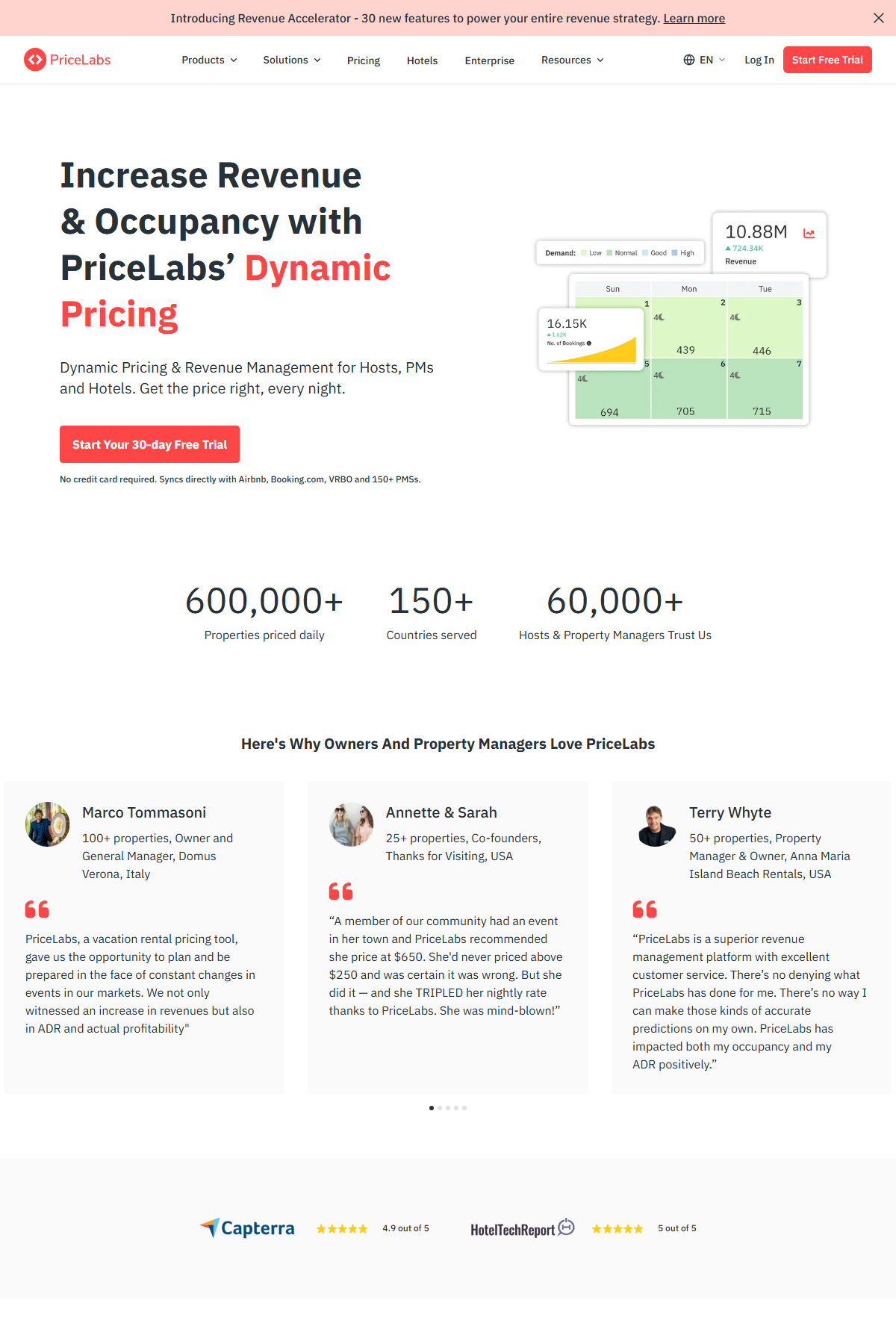
PriceLabs is the market leader by operator adoption. The pricing page requires login as of May 2026 (no public tiers disclosed). Contact PriceLabs directly for current pricing. Features include portfolio-level controls, a market dashboard, the deepest PMS integration list of the three tools, and the most configurable rule engine. Best fit for operators at 10+ properties who need granular control and have the time to configure it properly.
Beyond Pricing positions on ease of setup and a cleaner interface. The pricing page returned a 404 during our May 2026 research. Contact Beyond Pricing directly for current pricing. Community reports indicate simpler onboarding than PriceLabs with fewer configuration options. Better fit for operators who want a tool that works without deep configuration investment.
Wheelhouse redirected to topadvisor.com during our May 2026 research, which also returned a 404. Verify current product availability directly before planning any integration.
For independent reviews: G2’s PriceLabs review page returned a 403 block during our research. Capterra and GetApp both have accessible PriceLabs review pages as alternatives.
All vendor information sourced from public pages as of May 2026. Pricing subject to change. Verify directly with each vendor before purchasing.
Next steps
Dynamic pricing decisions don’t happen in isolation. Your PMS choice determines which tools integrate cleanly and how rate changes propagate across OTAs. A DP tool with a broken sync to your channel manager creates rate conflicts and calendar errors that cost more than the tool saves.
If you’re at 15+ properties and evaluating whether your PMS handles the integration correctly, the Hostaway review for growing operators covers how Hostaway’s channel distribution pairs with third-party pricing tools at that portfolio size.
If you’re still deciding on a PMS, Guesty alternatives in 2026 breaks down the landscape for operators at 5-50 properties, including integration compatibility with the main DP tools.
Frequently asked questions
- Does dynamic pricing work for every STR operator?
- No. Dynamic pricing delivers measurable gains when you have 5+ properties, clean historical data, and realistic base rates already calibrated manually. Below that threshold, the algorithm has too little signal to outperform well-calibrated manual pricing. Operators with 1-3 properties in low-supply markets typically see better results with manual seasonal adjustments.
- What is the difference between dynamic pricing and Airbnb Smart Pricing?
- Airbnb Smart Pricing optimizes for booking volume, not revenue. It prices to maximize occupancy within Airbnb's marketplace, which serves Airbnb's commission volume. Third-party tools like PriceLabs and Beyond Pricing optimize for RevPAR using floor rates you control. The ADR difference at equivalent occupancy is typically 15-25%, per aggregated operator community reports on forums like r/AirBnBHosts.
- How much do PriceLabs and Beyond Pricing cost?
- As of May 2026, PriceLabs' pricing page requires login (no public tiers disclosed) and Beyond Pricing's pricing page returned a 404. Neither tool publicly lists pricing. Contact each vendor directly for current quotes. Community reports on operator forums estimate $20-50/month for small portfolios, scaling with property count.
- How long before dynamic pricing shows results?
- Most operators report meaningful ADR changes after 60-90 days with auto-apply enabled. The first 30 days are calibration. Evaluating performance at 30 days and adjusting configuration typically resets the learning cycle and delays real results further.
- Can I run dynamic pricing without a PMS?
- Yes, with limits. PriceLabs and Beyond Pricing connect directly to Airbnb and Vrbo without a PMS. The limitation: if you run multiple OTAs, rates only sync to channels the tool directly integrates with. A PMS acting as the central rate hub ensures cross-channel consistency and prevents rate conflicts from causing calendar errors.
- Is Airbnb Smart Pricing a valid substitute for third-party dynamic pricing tools?
- Not for revenue optimization. Smart Pricing is designed to keep your listing competitive and booked within Airbnb, not to maximize ADR. For operators with ADR and RevPAR targets, third-party tools with configurable floor rates and market demand data are the correct category. Smart Pricing is a different product solving a different problem.